When developers build a new application, the focus is usually on the code: the architecture, the performance, the frameworks. Infrastructure often becomes an afterthought. The result? We see countless applications deployed into a default AWS VPC, with EC2 instances sitting in public subnets, and RDS databases exposed to the internet with weak passwords.
As a security-conscious developer, this is terrifying. Infrastructure should not be an afterthought; it should be secure by default.
The Vulnerable Architecture
Here is what a typical, vulnerable “Flat Network” deployment looks like in a Default VPC:

While few developers intentionally expose a database directly to the internet, deploying everything into a single, flat subnet is incredibly common. In this setup, a single zero-day vulnerability in your application or a compromised SSH key gives attackers a foothold on your server. From there, they have unrestricted lateral movement to attack your database.
In this article, I want to share how we designed the AWS Terraform infrastructure for our open-source `nodejs-quickstart-structure` generator. We focused on building a “zero-trust” environment, enforcing least privilege, and completely eliminating the need for exposed SSH ports.
1. The 3-Tier VPC Air-Gap: “If they can’t route to it, they can’t hack it”
The most common mistake is putting everything in a single subnet. If an attacker breaches the application server, they have a direct path to everything else.
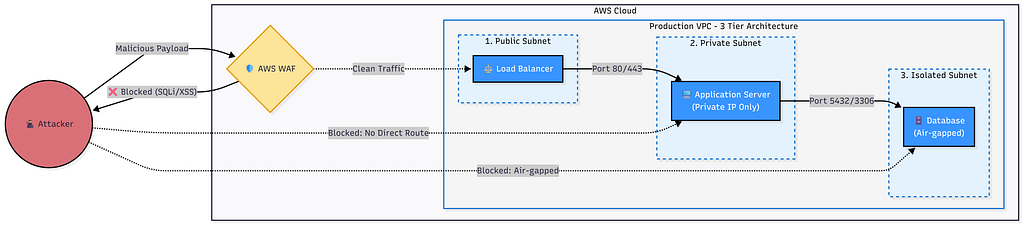
To solve this, we implemented a strict 3-Tier VPC Architecture:
1. Public Subnets: The only resources that sit here are the Application Load Balancer (ALB) and NAT Gateways. They are the *only* entry points from the internet.
2. Private Subnets: This is where the Node.js application (EC2) and Redis (ElastiCache) live. They have outbound internet access via the NAT Gateway (to download updates or call external APIs), but absolutely zero direct inbound access from the internet.
3. Isolated Subnets: This is the vault. The RDS database lives here. It has no internet gateway and no NAT gateway attached. It is completely air-gapped from the outside world.
The Secure Architecture
2. Least Privilege Security Groups
Network isolation is not enough. We must enforce strict rules on who can talk to whom. In our Terraform templates, we strictly define Security Groups (SGs):
- ALB SG: Allows inbound traffic on Port 80/443 from 0.0.0.0/0.
- App SG: Allows inbound traffic on Port 3000 ONLY from the ALB SG. Even if you knew the internal IP of the EC2 instance, you couldn’t ping it directly.
- Database SG: Allows inbound traffic on Port 5432/3306 ONLY from the App SG.
By linking Security Groups together (rather than IP ranges), we ensure that the database is completely invisible to everything except the application layer.
3. Banning Port 22: The End of SSH Keys
Managing SSH keys is a security nightmare. Keys get leaked, developers leave the company, and leaving Port 22 open (even to a specific IP) is a constant invitation for brute-force attacks.
In our architecture, we completely banned SSH.
Instead, we use AWS Systems Manager (SSM) Session Manager*. SSM allows secure, auditable terminal access to your EC2 instances directly through the AWS Console or CLI.
- No inbound ports need to be opened.
- No SSH keys to manage.
- Every session command is logged for auditing.
- Access is controlled purely via IAM roles.
4. WAF at the Edge: Stopping OWASP Top 10
For production environments, application-level validation isn’t enough. You need protection at the network edge. We integrated AWS WAF (Web Application Firewall) directly with the Application Load Balancer.
The WAF is configured with AWS Managed Rules to automatically block:
- SQL Injection (SQLi)
- Cross-Site Scripting (XSS)
- Known bad inputs and malicious bots.
By dropping malicious payloads at the edge, we save compute resources on the Node.js servers and add a crucial layer of defense-in-depth.
The Solution: Secure Infrastructure on Demand
Building this setup from scratch using the AWS Console takes hours and is highly prone to human error. Even writing the Terraform code yourself can take days to get right.
That’s why we built these security practices directly into our boilerplate generator. With a single CLI command, you can generate a complete Node.js application (REST/GraphQL, MVC/Clean Architecture) *alongside* the production-ready Terraform code.
npx nodejs-quickstart-structure@latest init -n "nodejs-service" -l "TypeScript" -a "Clean Architecture" -d "MySQL" --db-name "demo" -c "REST APIs" --caching "None" --ci-provider "GitHub Actions" --auth None --terraform "Production" --no-include-security --advanced-options
When prompted for infrastructure, selecting “Production” will instantly generate the full WAF + ALB + 3-Tier VPC architecture described above. You can even test the entire setup locally using LocalStack before deploying to real AWS.
Security shouldn’t be hard, and it shouldn’t be an afterthought. By utilizing IaC tools like Terraform, we can ensure every project starts with an enterprise-grade security posture on day one.
Explore the Architecture:
- GitHub : Nodejs Quickstart Generator
- How to use the tool and video demo
- Sample Project: nodejs-service-terraform
- **Documentation**: Enterprise Terraform Blueprint
- **Author**: Pau Dang (Senior SE)
Why Your Default VPC is a Hacker’s Playground: Designing a Zero-Trust AWS Architecture was originally published in System Weakness on Medium, where people are continuing the conversation by highlighting and responding to this story.