If you’re a frequent internet user, you’ve undoubtedly stumbled across countless websites asking you to “accept” or “reject” cookies.
No, not chocolate chip cookies… 🍪
But website cookies — those little pop-ups that look something like this:

You must have seen something like this before. So, what exactly are they?
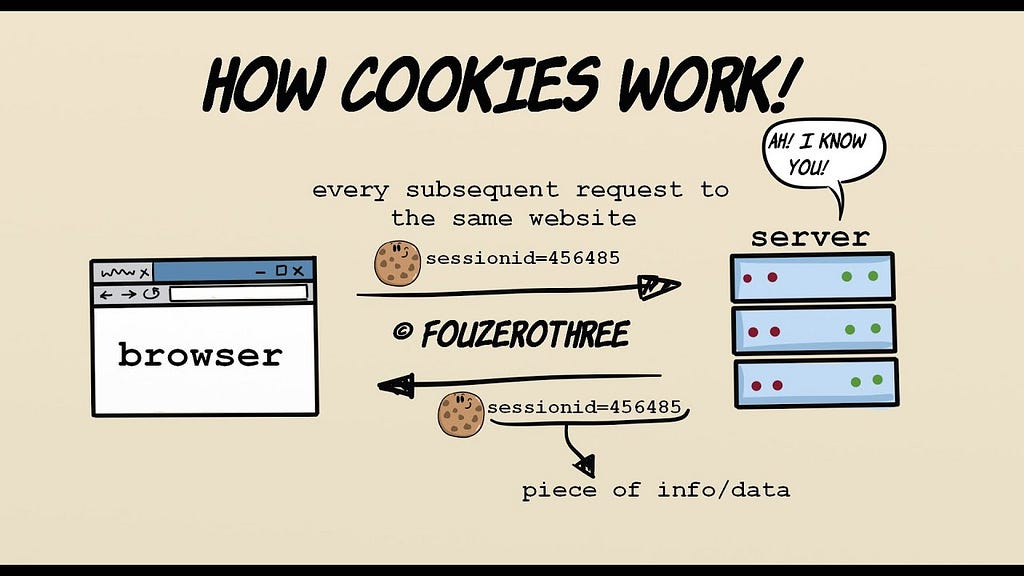
In simple terms, a website cookie is a small piece of data that a website’s server sends to your web browser used to remember information about you when you visit the website again.
Let’s break down how this works:
- Your First Visit: When you visit a website for the very first time, the website’s server generates a unique identifier — a cookie. This cookie is then sent to your web browser.
- Browser Stores It: Your browser receives this cookie and stores it on your computer or mobile device.
- Returning to the Site: Now, let’s say you return to that same website. Your browser will automatically send the previously stored cookie back to the website’s server with your request.
- Website Recognizes You: The website’s server receives this cookie ID and uses it to identify your past activity or preferences. For example:
- If it’s a shopping site like Amazon or eBay, the cookie helps the server retrieve your specific shopping cart items from your last visit or keep you logged in without re-entering credentials.
What are the different types of cookies?
While the primary function is remembering you, not all cookies are the same. There are usually 4 main types of cookies.
- First-Party Cookies: These are the ones we just discussed above.
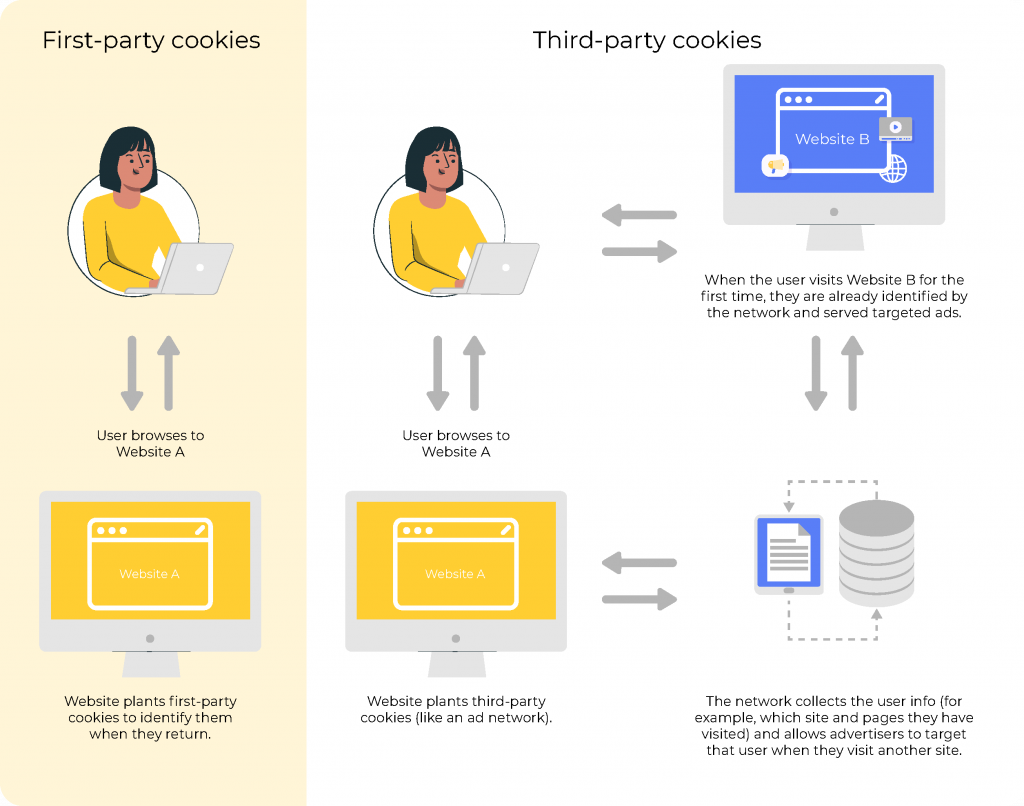
- Third-Party Cookies: These are created by domains other than the one you are currently visiting. They are often used by advertisers and analytics companies to track your browsing activity across multiple websites to build a profile for targeted advertising. These are the cookies that raise the most privacy concerns.
Here’s how third party cookies work:
Imagine you visit test.com, which has an advert on it for test2.com. When the ad loads, the test2.com advert also places its own separate cookie on your browser. Later, you visit another website, which also uses test2.com for ads. When the test2.com ad loads on this new site,test2.com can read the cookie it previously placed when you were on test.com. This allows test2.com to build a profile of your browsing habits across any other sites using their service.
To hopefully tie up understanding, lets say you have visited 3 separate sites with test2.com adverts on it and you were searching for hats, it can send that information to advertisers to promote hats for you on pages where the test2.com adverts are shown.
- Session Cookies: These are temporary and are only stored while you are actively browsing a website. They expire and are deleted once you close your browser. They’re typically used for managing your current session (like keeping you logged in as you navigate different pages).
- Persistent Cookies: These cookies remain on your device for a set period or until you manually delete them. They are used for remembering login details, preferences or for tracking user behaviour over time.
I hope that all made sense and clarifies some of your questions regarding cookies, if you have any further questions feel free to reach out and I will look to answer them.
About the Author

Hello all👋🏼
I’m Nelson Chukwuemeka-Awuja — an Application Analyst in the fintech SaaS sector and a future cybersecurity professional. I’m passionate about making complex cybersecurity concepts accessible to beginners. My goal with this blog is to answer your burning cyber questions, track my technical journey and share practical knowledge. Feel free to follow the journey and join me as we explore the latest trends, dissect real-world threats and build a stronger understanding of digital defence together.
Connect with me on LinkedIn — Click here!
Remember to clap the post and follow for more updates.
What are website cookies and how do they work? was originally published in System Weakness on Medium, where people are continuing the conversation by highlighting and responding to this story.