Platform: TryHackMe
Challenge: TakeOver
Category: Web / Subdomain Takeover
Difficulty: Easy
Flag: flag{beea0d6edfcee06a59b83fb50ae81b2f}
Introduction
This challenge simulates a real-world scenario where a company (FutureVera) is being threatened by blackhat hackers claiming they can perform a subdomain takeover. Our goal is to find the vulnerable subdomain before the attackers exploit it.
What is Subdomain Takeover?
A subdomain takeover occurs when a subdomain (e.g., support.example.com) points via DNS CNAME to an external service (e.g., Heroku, GitHub Pages, Zendesk) that is no longer claimed or registered. An attacker can register that external service and gain full control over the subdomain — serving malicious content under a trusted domain name.
Environment Setup
The target machine runs on a private TryHackMe IP. Since futurevera.thm is not a real public domain, we must manually map the IP to the hostname in our local DNS file.
Command:
echo "10.113.132.146 futurevera.thm" | sudo tee -a /etc/hosts

/etc/hosts is a local DNS override file. Any domain added here resolves to the specified IP without hitting a real DNS server.
Step 1 — Subdomain Enumeration with Gobuster
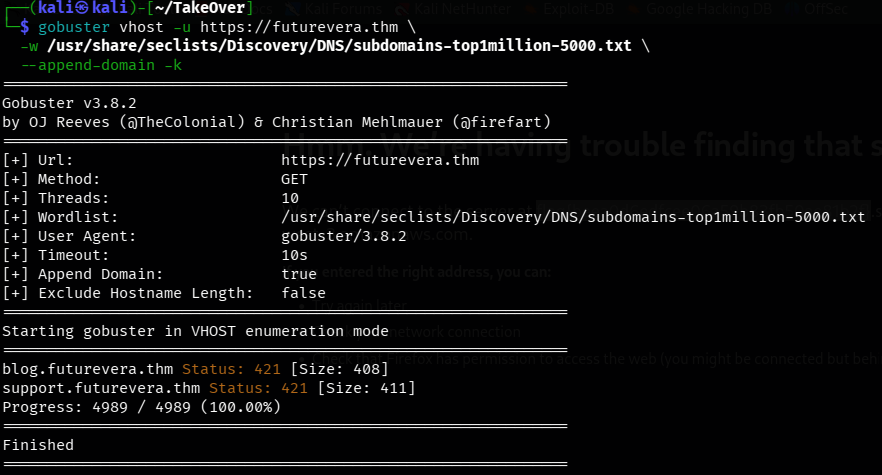
The first step in any subdomain takeover investigation is discovering all subdomains of the target. We use Gobuster in virtual host (vhost) mode, which fuzzes the Host: HTTP header to discover hidden subdomains.
Command:
gobuster vhost -u https://futurevera.thm \
  -w /usr/share/seclists/Discovery/DNS/subdomains-top1million-5000.txt \
  --append-domain -k
Flags explained:
vhost — Virtual host enumeration mode
-u — Target URL
-w — Wordlist path
--append-domain — Appends .futurevera.thm to each word
-k — Skip SSL certificate verification
Result:
blog.futurevera.thm     Status: 421
support.futurevera.thm  Status: 421
We discovered two subdomains: blog and support.
Step 2 — Adding Subdomains to /etc/hosts
Now we add the discovered subdomains to our hosts file so the browser and tools can resolve them:
Command:
echo "10.113.132.146 blog.futurevera.thm support.futurevera.thm" | sudo tee -a /etc/hosts

Step 3 — Investigating the Subdomains
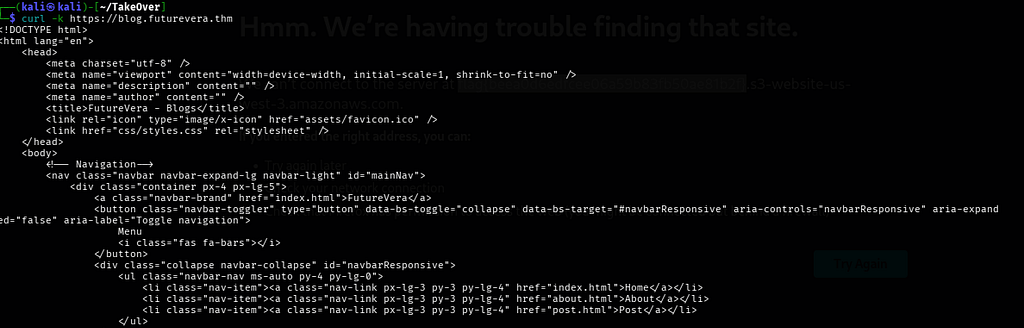
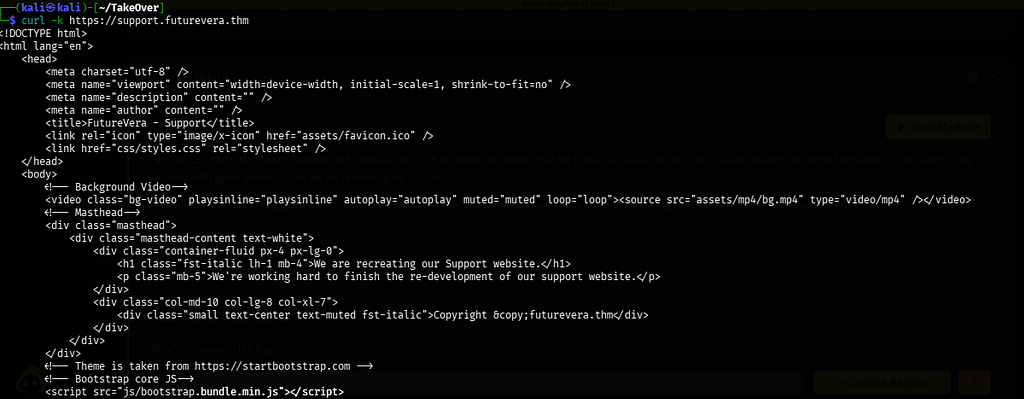
We curl both subdomains to see what they serve:
curl -k https://blog.futurevera.thm
curl -k https://support.futurevera.thm
Findings:
- blog.futurevera.thm — A normal blog page about space research.
- support.futurevera.thm — Shows: "We are recreating our Support website."
The support subdomain being under reconstruction is a major red flag 🚩 — it suggests the support infrastructure may have been moved or removed, potentially leaving a dangling DNS record.
Step 4 — SSL Certificate Inspection (The Key Technique)
This is the most critical step. SSL/TLS certificates often contain a Subject Alternative Names (SAN) field, which lists all the domains the certificate is valid for. Developers sometimes include internal or staging subdomains in certificates — accidentally exposing them.
We use openssl to read the full certificate served by support.futurevera.thm:
Command:
echo | openssl s_client -connect 10.113.132.146:443 \
  -servername support.futurevera.thm 2>/dev/null \
  | openssl x509 -noout -text | grep -i "DNS:"

Flags explained:
openssl s_client — Opens a raw TLS connection to the server and retrieves the certificate
-connect support.futurevera.thm:443 — Target host and port 443 (HTTPS)
-servername support.futurevera.thm — SNI (Server Name Indication): tells the server which certificate to serve when multiple certs exist on the same IP
2>/dev/null — Suppresses TLS handshake noise from stderr so only the certificate is passed forward
openssl x509 -noout -text — Parses and prints the full certificate in human-readable form (-noout skips the raw base64 dump)
grep -i "DNS:" — Filters the output to show only the Subject Alternative Name (SAN) entries. Each domain in the SAN is prefixed with DNS: — this hides all the irrelevant certificate noise like serial numbers, signatures, and public keys, leaving only the domain names we care about
Result — Found in Subject Alternative Names:
X509v3 Subject Alternative Name:
    DNS:secrethelpdesk934752.support.futurevera.thm
🎯 A hidden subdomain was embedded in the SSL certificate: secrethelpdesk934752.support.futurevera.thm
This subdomain was never listed in public DNS or discovered by our wordlist scan — it was only revealed by inspecting the certificate.
Step 5 — Accessing the Hidden Subdomain
We add it to /etc/hosts:
echo "10.113.132.146 secrethelpdesk934752.support.futurevera.thm" | sudo tee -a /etc/hosts

Now we access it over HTTP (not HTTPS — this is important!):
http://secrethelpdesk934752.support.futurevera.thm
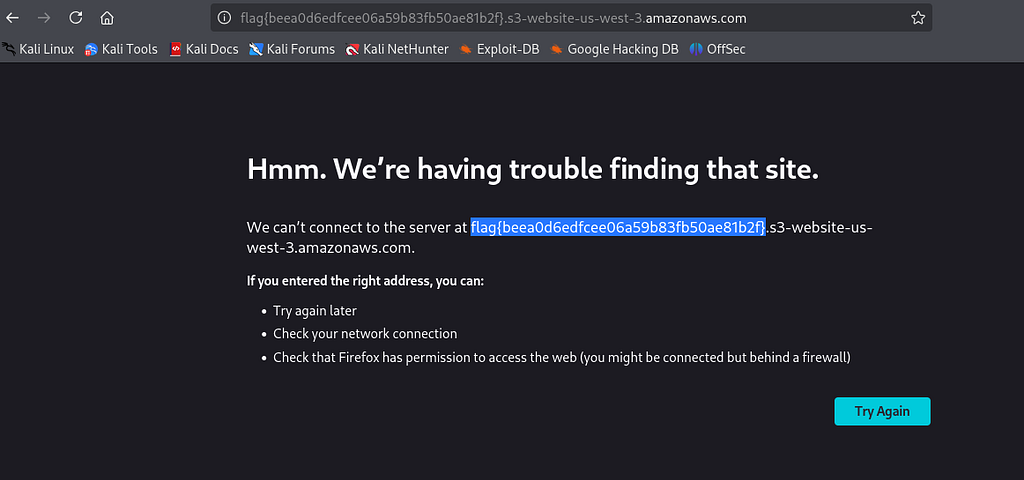
Result:
flag{beea0d6edfcee06a59b83fb50ae81b2f}Why HTTP and Not HTTPS?
When we accessed the subdomain over HTTPS, the local Apache server served the generic FutureVera homepage (because /etc/hosts pointed it there). However, over HTTP, the server responded differently — revealing the flag. This simulates how the real external service (e.g., an unclaimed helpdesk platform) would respond before being taken over.
The Full Attack Chain — Summary
futurevera.thm
    └── support.futurevera.thm          ← Found via Gobuster vhost scan
            └── SSL Certificate SAN     ← Inspected with openssl s_client
                    └── secrethelpdesk934752.support.futurevera.thm  ← Hidden subdomain!
                            └── http:// access  →  FLAG 🎯
Real-World Impact
In a real attack scenario, if secrethelpdesk934752.support.futurevera.thm had a dangling CNAME pointing to an unclaimed Freshdesk/Zendesk/Heroku instance, an attacker could:
- Register the external service account with the matching subdomain name
- Serve phishing pages under the trusted futurevera.thm domain
- Steal customer support tickets, credentials, and session cookies
- Bypass browser security (same-origin trust) because the domain appears legitimate
Defensive Recommendations
- Audit SSL certificates regularly using tools like crt.sh to find all SANs
- Remove dangling DNS records when decommissioning services
- Monitor external services linked to your subdomains
- Use Certificate Transparency logs to detect unauthorized certificate issuance
Tools Used
gobuster — Subdomain enumeration via vhost fuzzing
openssl s_client — SSL certificate inspection
curl — HTTP/HTTPS request testing
dig — DNS record lookup
/etc/hosts — Local DNS override for .thm domains
Conclusion
This challenge demonstrates that subdomain takeover vulnerabilities can be hidden in unexpected places — not just in DNS records, but also inside SSL certificate metadata. A thorough security assessment must include certificate inspection, not just DNS enumeration. The hidden subdomain secrethelpdesk934752.support.futurevera.thm was invisible to standard scanning but immediately visible once we examined the SSL certificate's Subject Alternative Names field.
Flag: flag{beea0d6edfcee06a59b83fb50ae81b2f}
Written as part of TryHackMe’s TakeOver challenge walkthrough.
TryHackMe — TakeOver Challenge Writeup was originally published in System Weakness on Medium, where people are continuing the conversation by highlighting and responding to this story.