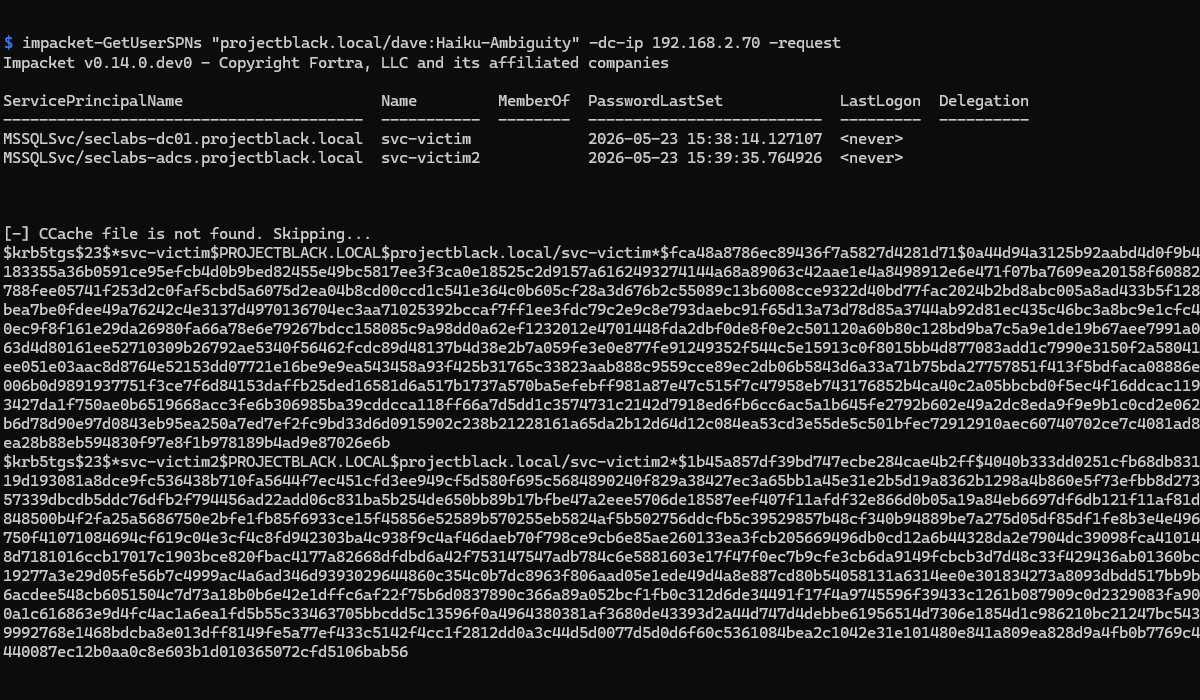
Fundamentally, Kerberoasting attacks abuse expected functionality within the Kerberos protocol. Service tickets (STs) are encrypted using the target service account's password hash, any authenticated domain user can request a ST for any Service Principal Name (SPN) within the domain.
When an SPN is assigned to a user account, it effectively means that any authenticated user can request a ticket encrypted with that account’s password hash and attempt to crack it offline. Attackers and penetration testers abuse this to potentially achieve privilege escalation within the environment.
Checking if an SPN is Active
Before removing a SPN you might want to check if it's still being used. Sifting through Event ID 4769 logs Kerberos service ticket requests can help with this.
Get-WinEvent -FilterHashtable @{
    LogName='Security'
    ID=4769
} | ForEach-Object {
    [PSCustomObject]@{
        TimeCreated = $_.TimeCreated
        Requestor   = $_.Properties[0].Value
        SPN         = $_.Properties[2].Value
        Encryption  = $_.Properties[8].Value
        ClientIP    = $_.Properties[6].Value
    }
} | Where-Object {
    $_.SPN -ne 'krbtgt' -and
    $_.SPN -notlike '*$'
} | Format-Table -AutoSize
Log into your Domain Controller and run this script.
If you see any output it means that the given SPN in the table is actively used.

Impact of Deleting an Active SPN
If your logs don't go back far enough to give you confidence. These are the impacts of deleting an SPN that may be active:
- Applications/services that can only communicate over Kerberos will stop working.
- Applications/services that support both Kerberos and NTLM will fallback to using NTLM for authentication.
Removing Unused SPNs
This is the easy part. If you've determined that you it's safe to delete/remove an SPN you can do this using setspn or via ADUC.
CLI: setspn -D MSSQLSvc/seclabds-dc01.projectblack.local projectblack.local\svc-victim
ADUC: Toggle Advanced Features to show the Attribute Editor for AD Objects.
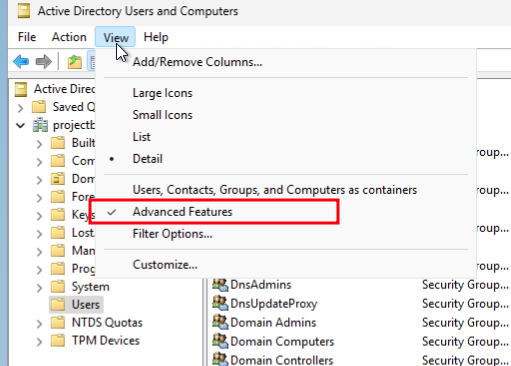
Then find the user account with the SPN, Open Attribute Editor and browse to the servicePrincipalName Attribute.
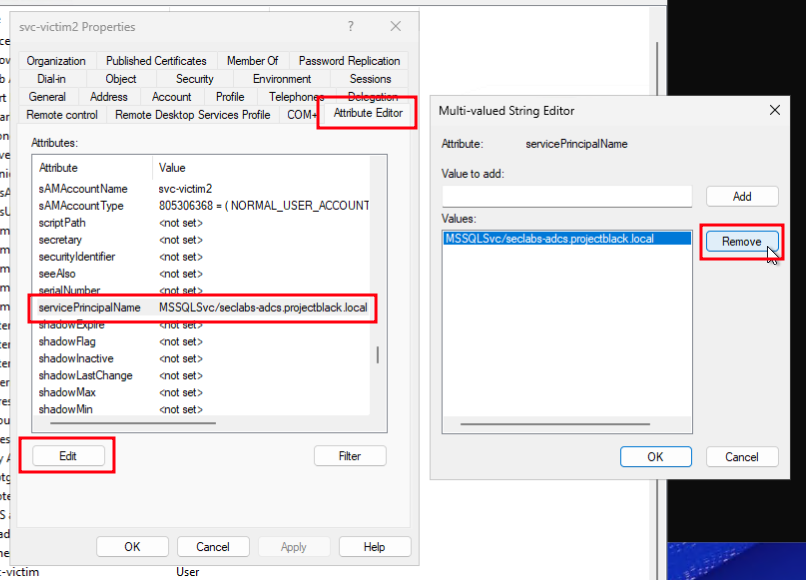
Clicking Edit on this attribute will open a new dialog box allowing you to select the SPN you wish to remove. Remember to click Apply after closing everything out.
Listing SPNs in Active Directory
If you'd like to check what other SPNs may exist in your environment which have been assigned to a User Account the following script can be used.
# AD Powershell Module required
Get-ADUser -Filter {ServicePrincipalName -like "*"} `
-Properties ServicePrincipalName |
Select Name, SamAccountName, ServicePrincipalName

# What the output might look like
Name        SamAccountName ServicePrincipalName
----        -------------- --------------------
krbtgt      krbtgt         {kadmin/changepw}
svc-victim  svc-victim     {MSSQLSvc/seclabs-dc01.projectblack.local}
svc-victim2 svc-victim2    {MSSQLSvc/seclabs-adcs.projectblack.local}
This will list all user accounts with a SPN set. krbtgt is expected to have a SPN.
Alternative - Reduce Privileges and Set a Strong Password
As an alternative to removing an SPN, mitigating Kerberoasting attacks is relatively straightforward.
By setting a long, randomly generated passwords for all service accounts with SPNs it becomes practically impossible to exploit. An attacker can still request and extract a service ticket, the resulting hash becomes computationally impractical to crack within a realistic timeframe.
Additionally, reducing the privileges assigned to service accounts limits the potential impact of a successful compromise. If your attacker somehow has their hands on a quantum computer, a least-privileged account dramatically reduces what they can actually do with it.