Using a setuid binary to run a command as another user and why understanding privilege escalation through file permissions is one of the most important Linux security concepts in this entire series.
Introduction
Day 19. Bandit Level 19 to Level 20. There is no readme file this time. No hidden file, no encoded text, no compressed archive. There is a single executable sitting in the home directory and it has a permission bit set that none of the previous levels have used: the setuid bit. That one bit changes everything about what running this program actually does.
This level introduces setuid binaries, one of the most important and most exploited concepts in Linux privilege management. A setuid program runs with the permissions of the file’s owner rather than the permissions of the user who launched it. That single property is what allows a regular user to execute an action that would normally require a different account entirely, and it is also one of the most common privilege escalation vectors attackers look for on any Linux system.
By the end of this article you will understand what the setuid bit does, how to identify it in a directory listing and how it was used here to read a password file that the current user would otherwise have no permission to access.
Level Objective
To gain access to the next level, you should use the setuid binary in the homedirectory. Execute it without arguments to find out how to use it. The password for this level can be found in the usual place (/etc/bandit_pass), after you have used the setuid binary.
Approach
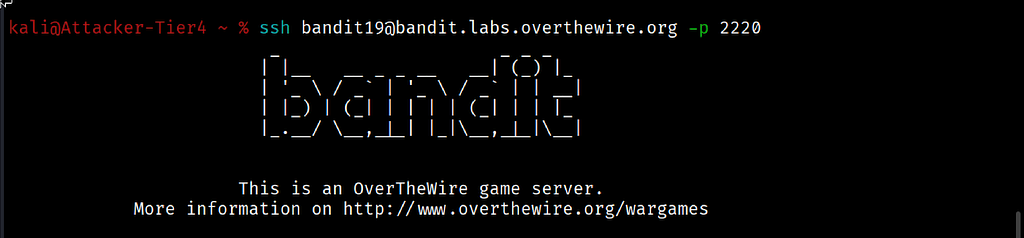
I connected from my local Kali machine using the password retrieved from the previous level:
ssh [email protected] -p 2220
The full Bandit ASCII art banner loaded and the prompt changed to bandit19@bandit:~$.
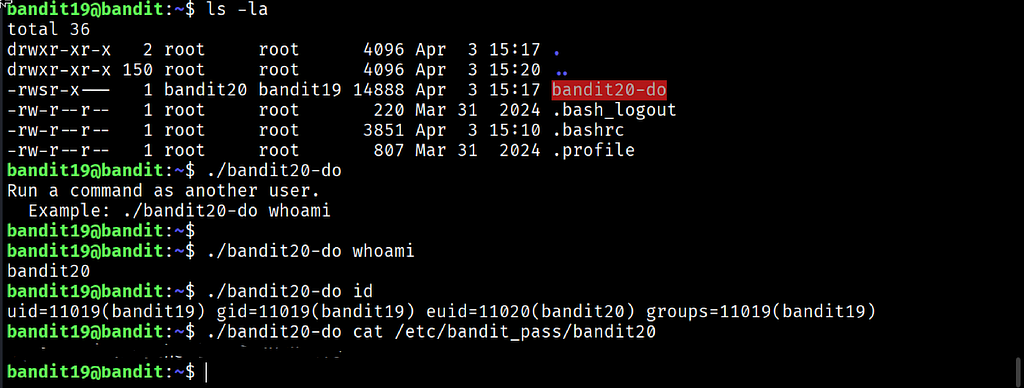
I ran ls -la and saw a single executable: bandit20-do. The permission string was -rwsr-x---, owned by bandit20 with group bandit19. That lowercase s in the owner's execute position is the setuid bit. It means that whoever runs this file executes it with bandit20's permissions, not their own.
Following the level instructions I ran it without any arguments first to see how it works:
./bandit20-do
The output explained itself clearly: “Run a command as another user. Example: ./bandit20-do whoami". I tested that exact example:
./bandit20-do whoami
The output returned bandit20, confirming that the command executed as that user rather than as bandit19. I checked further with id:
./bandit20-do id
The output showed uid=11019(bandit19) gid=11019(bandit19) euid=11020(bandit20) groups=11019(bandit19). The effective user ID, euid, was set to bandit20 even though the real user ID remained bandit19. That is the setuid mechanism working exactly as designed.
With that confirmed, I used bandit20-do to run cat against the password file for the next level, a file that bandit19 alone could never read directly:
./bandit20-do cat /etc/bandit_pass/bandit20
The password printed to the terminal.
Commands Used
# Connect to the Bandit server as bandit19 using the Level 19 password
ssh [email protected] -p 2220
# List the home directory to find the setuid binary
ls -la
# Run the binary without arguments to see usage instructions
./bandit20-do
# Confirm which user the binary executes commands as
./bandit20-do whoami
# Check the full identity context including real and effective user IDs
./bandit20-do id
# Use the binary to read the password file as bandit20
./bandit20-do cat /etc/bandit_pass/bandit20
Command Breakdown
-rwsr-x--- The permission string for bandit20-do. The lowercase s in the owner execute position is the setuid bit. When set, any user who executes this file runs it with the permissions of the file's owner, bandit20, rather than their own permissions.
./bandit20-do Running the binary with no arguments triggers its built-in usage message, which is good design practice for any tool that takes arguments. This confirms the correct syntax before attempting anything else.
./bandit20-do whoami Passes whoami as the command to be executed by the setuid binary. The output bandit20 confirms the binary is running the given command under a different effective identity than the user who launched it.
./bandit20-do id Provides a complete picture of the process identity. uid is the real user who started the process. euid is the effective user ID under which the process is actually operating, which is what permission checks are evaluated against. The mismatch between uid=bandit19 and euid=bandit20 is the entire mechanism of this level visible in one line.
./bandit20-do cat /etc/bandit_pass/bandit20 Uses the setuid binary to run cat against a file that only bandit20 can read directly. Because the binary executes with bandit20's effective permissions, the file read succeeds even though the logged-in user is bandit19.
Lesson Learned
The main technical takeaway is that the setuid bit changes which permissions apply during execution, not which user is logged in. The real user ID stays the same throughout the entire session. The effective user ID is what changes, and it is the effective user ID that the kernel checks when deciding whether a file access is permitted.
What made this level click was seeing the id output directly. Reading about setuid in the abstract is one thing. Seeing uid=11019(bandit19) next to euid=11020(bandit20) on the same line makes the concept concrete immediately. The same process, two different identities depending on which check you are looking at.
The other lesson is about restraint. This binary only allowed reading the password file because that is what it was designed to do. A poorly designed or intentionally malicious setuid binary could allow far more, and that exact risk is why setuid binaries are scrutinised so heavily in real system audits.
- ls -la — always check for the s permission bit when investigating unfamiliar executables
- ./binary — run with no arguments first to discover usage instructions safely
- id — check real versus effective user and group IDs to confirm privilege context
- find / -perm -4000 2>/dev/null — search the entire system for setuid binaries
- whoami — quick check of effective identity during any privilege investigation
🔴 SOC Analyst Insight
Setuid binaries are one of the most heavily audited categories of files during Linux security assessments because misconfigured or vulnerable setuid programs are a direct path to privilege escalation. An attacker who gains low-privilege access to a system will routinely search for setuid binaries owned by root, since executing one successfully can grant root-level access through the exact same effective user ID mechanism demonstrated in this level.
# Search the entire file system for setuid binaries, a standard step in privilege escalation enumeration
find / -perm -4000 -type f 2>/dev/null
The command above searches for every file with the setuid bit set across the entire system. During both offensive security testing and defensive system hardening, this list needs to be reviewed carefully. Any setuid binary that is not a standard, well-audited system tool, or any custom setuid binary with unclear purpose, is worth investigating immediately. This Bandit level is a clean educational example of exactly the mechanism that real privilege escalation techniques exploit.
Key Takeaway
The setuid bit is a permission mechanism that allows a program to run with the file owner’s privileges rather than the privileges of whoever launches it. That capability is legitimate and necessary for certain system tools, but it is also one of the most consistently abused mechanisms in Linux privilege escalation. Understanding the difference between real and effective user IDs, knowing how to identify the setuid bit in a directory listing and knowing how to search for setuid binaries across a system are skills that apply directly to both penetration testing and defensive system auditing.
30-Day Cybersecurity Learning Journey — Progress
🟢 Open Day — Setup & Series Introduction  | OverTheWire Bandit
✅ Day 0.   — Bandit Level 0               | First Login
✅ Day 1.   — Bandit Level 1 → 2           | Special Characters
✅ Day 2.   — Bandit Level 2 → 3           | Spaces in Filenames
✅ Day 3.   — Bandit Level 3 → 4           | Hidden Files
✅ Day 4.   — Bandit Level 4 → 5           | File Types
✅ Day 5.   — Bandit Level 5 → 6           | find with Properties
✅ Day 6.   — Bandit Level 6 → 7           | find across Filesystem
✅ Day 7.   — Bandit Level 7 → 8           | grep
✅ Day 8.   — Bandit Level 8 → 9           | sort and uniq
✅ Day 9.   — Bandit Level 9 → 10          | strings and grep
✅ Day 10.  — Bandit Level 10 → 11         | base64
✅ Day 11.  — Bandit Level 11 → 12         | ROT13 and tr
✅ Day 12.  — Bandit Level 12 → 13         | hexdump and compression
✅ Day 13.  — Bandit Level 13 → 14         | SSH keys
✅ Day 14.  — Bandit Level 14 → 15         | Netcat
✅ Day 15.  — Bandit Level 15 → 16         | SSL and OpenSSL
✅ Day 16.  — Bandit Level 16 → 17         | Port Scanning
✅ Day 17.  — Bandit Level 17 → 18         | diff
✅ Day 18.  — Bandit Level 18 → 19         | SSH command execution
✅ Day 19.  — Bandit Level 19 → 20         | Setuid binaries  ← today
⬜ Day 20.  — Bandit Level 20 → 21         | coming next
Follow along with the series as I document each level, command and lesson learned.
The setuid bit decides whose permissions matter. Knowing how to read that bit is knowing where the real access lives.
OverTheWire Bandit Walkthrough — Level 19 → 20 | 30-Day Cybersecurity Learning Journey (Day 19) was originally published in System Weakness on Medium, where people are continuing the conversation by highlighting and responding to this story.