Decoding ROT13 using the tr command and why understanding simple substitution ciphers helps analysts identify and reverse obfuscated content faster in real investigations.
Introduction
Day 11. Bandit Level 11 to Level 12. Yesterday the file was base64 encoded, a format with a clear visual signature and a single decode command. Today the file contains text that looks almost readable. The words are the right length, the spacing is normal and every character is a standard letter. But none of it makes sense. That is the signature of ROT13, one of the simplest and oldest text obfuscation methods that still appears in real security work today.
This level introduces the tr command, a tool that translates characters according to a mapping you define. It works at the character level, is fast on any file size and requires no external tools or libraries. ROT13 is the use case that introduces it here but tr has applications across log processing, data cleaning and text manipulation that extend far beyond simple ciphers.
By the end of this article you will know how ROT13 works, how to reverse it in one command and why character substitution is a technique that appears in both historical ciphers and modern attacker tooling.
Level Objective
The password for the next level is stored in the file data.txt, where all lowercase (a-z) and uppercase (A-Z) letters have been rotated by 13 positions. Numbers and symbols are left unchanged. The objective is to reverse the rotation and read the original password. The commands suggested by OverTheWire for this level include tr along with grep, sort, uniq, strings, base64 and others. The official page also links to the ROT13 Wikipedia article as a reference.
Approach
I logged in using the password retrieved from the previous level:
ssh [email protected] -p 2220
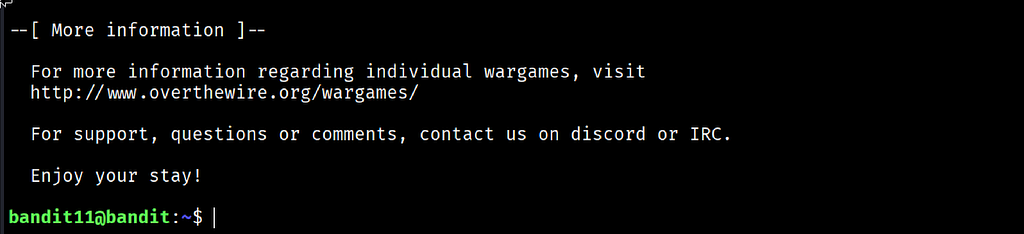
The banner loaded and ended with “Enjoy your stay!” and the prompt changed to bandit11@bandit:~$.
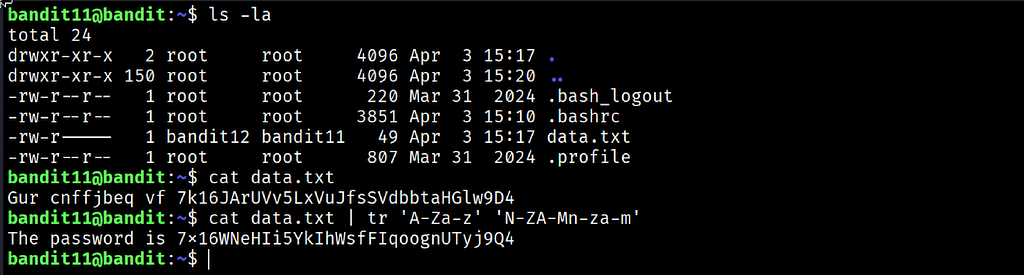
I ran ls -la and confirmed data.txt was present, owned by bandit12 with group bandit11, permissions -rw-r----- and a size of 49 bytes. I read it first with cat to see what the encoded content actually looked like:
cat data.txt
The output was: Gur cnffjbeq vf 7k16JArUVv5LxVuJfsSVdbbtaHGlw9D4
The structure was immediately familiar. The words were the right length and spaced correctly but shifted. Gur is The shifted by 13. cnffjbeq is password shifted by 13. This was ROT13.
ROT13 shifts every letter forward by 13 positions in the alphabet. Since the English alphabet has 26 letters, shifting by 13 twice returns to the original. That means encoding and decoding ROT13 use the exact same operation. I piped the file through tr with the full character mapping:
cat data.txt | tr 'A-Za-z' 'N-ZA-Mn-za-m'
The output printed as a complete plain English sentence: The password is 7x16WNeHIi5YkIhWsfFIqoognUTyj9Q4.
Commands Used
# Connect to the Bandit server as bandit11 using the Level 11 password
ssh [email protected] -p 2220
# Check the file and confirm its size before approaching it
ls -la
# Read the raw file to see the encoded content before decoding
cat data.txt
# Decode the ROT13 content using tr with the full character substitution mapping
cat data.txt | tr 'A-Za-z' 'N-ZA-Mn-za-m'
Command Breakdown
cat data.txt Reading the raw file first was deliberate. Seeing the encoded output confirmed the format before choosing a tool. The word lengths and spacing of Gur cnffjbeq vf match The password is exactly, which confirmed ROT13 rather than a random cipher.
tr 'A-Za-z' 'N-ZA-Mn-za-m' Translates characters from the first set to the corresponding characters in the second set. Every uppercase and lowercase letter is mapped to its ROT13 equivalent. The mapping wraps at the midpoint of the alphabet: A becomes N, B becomes O, N becomes A and so on. Numbers, spaces and punctuation pass through unchanged.
tr Short for translate. It reads input character by character and substitutes each one that appears in the first set with the corresponding character from the second set. It does not work on words or lines. It operates at the individual character level, which makes it the right tool for cipher operations and character-level transformations.
'A-Za-z' The first argument defines the set of characters to look for in the input. This range covers all uppercase and lowercase letters in the alphabet.
'N-ZA-Mn-za-m' The second argument defines the substitution mapping. This is the ROT13 table written as character ranges. It maps the second half of each alphabet back to the first half and vice versa, for both uppercase and lowercase letters simultaneously.
Lesson Learned
The main technical takeaway is that ROT13 is not encryption. Like base64 it is a reversible transformation that offers no security at all. Anyone who recognises the shifted pattern can decode it immediately using the same operation in reverse. It persists because it is simple, requires no key and is just unfamiliar enough to slow down casual observation.
Reading the raw encoded file with cat before decoding was the right move. Seeing Gur cnffjbeq vf and recognising the word-length pattern as The password is is the kind of pattern recognition that builds over time. The more encoding schemes you encounter, the faster you identify them without needing to look anything up.
The self-inverting property of ROT13 is also worth locking in. Applying the same tr command twice returns the original text. Encoding and decoding are identical operations. That is unusual and memorable.
- cat file | tr 'A-Za-z' 'N-ZA-Mn-za-m' — decode or encode ROT13 text
- tr 'a-z' 'A-Z' — convert all lowercase letters to uppercase
- tr -d '\n' — delete all newline characters from input
- tr -s ' ' — squeeze multiple consecutive spaces into a single space
- echo "text" | tr 'A-Za-z' 'N-ZA-Mn-za-m' — decode a ROT13 string directly from the terminal
🔴 SOC Analyst Insight
Simple substitution ciphers including ROT13 and Caesar cipher variants appear in attacker tooling more regularly than most analysts expect. Obfuscated PowerShell scripts, encoded configuration files and shellcode loaders sometimes use character substitution as a lightweight layer of obfuscation designed to slow down automated detection rather than prevent human analysis. An analyst who recognises a shifted character pattern can decode it in seconds. One who does not may spend significantly longer trying to understand content that has a trivial solution.
# Decode a ROT13 obfuscated string extracted from a suspicious script during triage
echo "Nggntxre vf hfvat cbeg 4444" | tr 'A-Za-z' 'N-ZA-Mn-za-m'
The command above decodes a ROT13 string that might appear inside an obfuscated dropper or configuration file. The decoded output reveals the attacker’s actual message instantly. In a triage context that kind of quick decode converts obfuscated content into actionable intelligence without breaking workflow or requiring any external tools.
Key Takeaway
ROT13 is a reminder that obfuscation and encryption are not the same thing. Simple character substitution creates the appearance of unreadable content but offers no real protection against anyone who recognises the pattern. The tr command reverses it in a single pipeline and also opens up a much wider range of character-level text processing beyond cipher work. Knowing the encoding, recognising it on sight and reversing it immediately is the complete skill this level builds.
30-Day Cybersecurity Learning Journey — Progress
🟢 Open Day — Setup & Series Introduction  | OverTheWire Bandit
✅ Day 0.   — Bandit Level 0               | First Login
✅ Day 1.   — Bandit Level 1 → 2           | Special Characters
✅ Day 2.   — Bandit Level 2 → 3           | Spaces in Filenames
✅ Day 3.   — Bandit Level 3 → 4           | Hidden Files
✅ Day 4.   — Bandit Level 4 → 5           | File Types
✅ Day 5.   — Bandit Level 5 → 6           | find with Properties
✅ Day 6.   — Bandit Level 6 → 7           | find across Filesystem
✅ Day 7.   — Bandit Level 7 → 8           | grep
✅ Day 8.   — Bandit Level 8 → 9           | sort and uniq
✅ Day 9.   — Bandit Level 9 → 10          | strings and grep
✅ Day 10.  — Bandit Level 10 → 11         | base64
✅ Day 11.  — Bandit Level 11 → 12         | ROT13 and tr  ← today
⬜ Day 12.  — Bandit Level 12 → 13         | coming next
Follow along with the series as I document each level, command and lesson learned.
Obfuscation relies on the observer not knowing what they are looking at. Recognition is the only tool it cannot survive.
OverTheWire Bandit Walkthrough — Level 11 → 12 | 30-Day Cybersecurity Learning Journey (Day 11) was originally published in System Weakness on Medium, where people are continuing the conversation by highlighting and responding to this story.