This blog post is a continuation of the previous entry “Harnessing the Power of Cobalt Strike Profiles for EDR Evasion“ and its follow-up, Part 2. Following the release of Cobalt Strike 4.13 by Fortra, we immediately began exploring the newly introduced capabilities and evaluating their impact on operational security. Through testing and experimentation, we developed an updated set of Malleable C2 profiles designed to further strengthen detection evasion techniques. Every feature introduced in this blog is already implemented in the CS 4.13 malleable profiles within our GitHub repository.
Drip Loading
Although this capability was introduced in Cobalt Strike 4.12, it remains highly relevant due to its potential impact on detection evasion and therefore deserves to be mentioned in this post.
One approach EDRs can take to detect process injections is through correlating different events for common injection primitives.
Instead of allocating a large chunk of memory as most shellcode loaders do, the Drip Loading technique allocates multiple smaller chunks of memory until the entire payload is reserved.
Additionally, the dripload_delay and rdll_dripload_delay, are extremely useful options, which introduces delay between each allocation chunk. This further enhances the evasion capability by breaking event correlation that EDRs usually rely on for identifying common injection primitives.
This feature is available for the reflective loader options and can be configured via the new Malleable C2 settings as seen below:
stage {set allocator "VirtualAlloc"; # The only compatible allocator with DripLoadingset rdll_use_driploading “true”;set rdll_dripload_delay “100”; //adds a further delay ifdesired}
Similarly, drip loading can be configured for process injection via the new Malleable C2 options for the process-inject block as shown below:
process-inject {set allocator "VirtualAlloc"; # The only compatible allocator with DripLoadingset use_driploading "true";set dripload_delay "100"; //adds a further delay if desired}
The only compatible allocation method for Drip Loading is VirtualAlloc, every other allocation method will result in a fail during profile check:
[!] .stage.rdll_use_driploading and .stage.rdll_dripload_delay are ignored when .stage.allocator is not VirtualAllocSince we have now switched to VirtualAlloc for the allocation primitive, we can enhance it by using indirect syscalls, making it the new final configuration set:
stage {set allocator "VirtualAlloc"; # The only compatible allocator with DripLoadingset rdll_use_driploading “true”;set rdll_dripload_delay “200”;set rdll_use_syscalls "true"; # NtVirtualAlloc instead of VirtualAllocset syscall_method "indirect";}process-inject {set allocator "VirtualAlloc"; # The only compatible allocator with DripLoadingset use_driploading "true";set dripload_delay "100"; //adds a further delay if desired}
Through memory analysis, we have observed that the payload is spread across 64 KB memory regions, whose permissions are constantly changed to RW and RX through each beacon iteration cycle:

Memory regions showing committed pages where beacon is stored
OPSEC Note: Although this blog demonstrates Drip Loading using the VirtualAlloc allocation primitive and indirect syscalls for simplicity and ease of setup, our preferred configuration is to pair Drip Loading with the default Cobalt Strike Sleep Mask (updated in version 4.13).
The latest Sleep Mask implementation now performs return address spoofing for all proxied BeaconGate calls, including VirtualAlloc. As a result, it effectively mitigates the primary drawback typically associated with using VirtualAlloc, while retaining the operational benefits of Drip Loading. In our assessment, this combination represents the most effective Drip Loading configuration currently available.
While this setup requires some additional configuration, the process is relatively straightforward. We previously covered BeaconGate and its initial setup in detail in Part 2 of this blog series, which can be used as a starting point for implementing this configuration.
Check-in Delay
It can be a good idea to introduce delays where possible, as this breaks detections that rely on event timing correlation heuristics. Beacon now supports the checkin_delay Malleable C2 option. This will delay Beacon’s initial check-in to break event correlation detection heuristics on reflective loading and the immediate metadata exchange.
set checkin_delay "5000";
checkin_delaywill result in a delay of the beacon showing up in the client GUI since the metadata is delayed as well.
Deprecated Features
After implementing the new features into our profile, we immediately encountered validation errors during the C2Lint process.
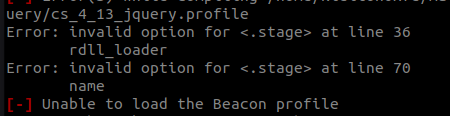
The reported issues were related to the following directives within the stage block:
stage {set rdll_loader "PrependLoader";set name "ActivationManager.dll";}
The warning regarding rdll_loader was expected. As previously announced in Fortra’s Cobalt Strike 4.11 release blog, Beacon now utilizes the Prepend Loader by default. With the Stomp Loader scheduled for deprecation, there is no longer a need to explicitly select between the two loader implementations. Simply removing the rdll_loader directive was sufficient to resolve that validation error.
The name directive also triggered a linting error. Removing this option makes the profile valid again; however, we were unable to determine the exact reason for this behavior.
Conclusion
With the release of Cobalt Strike 4.13, several subtle but impactful changes have been introduced that further enhance the flexibility and stealth of Beacon operations. Throughout this post, we explored how modern features such as Drip Loading, the updated Sleep Mask implementation, and BeaconGate integration can be combined to reduce behavioral indicators against event-correlation and memory-based detection techniques. All of the improvements discussed in this article have been already added in Cobalt Strike 4.13 profiles, which are available in our GitHub repository for further testing and research.
Resources
https://download.cobaltstrike.com/releasenotes.txt
https://www.cobaltstrike.com/blog/cobalt-strike-413-lost-in-translation